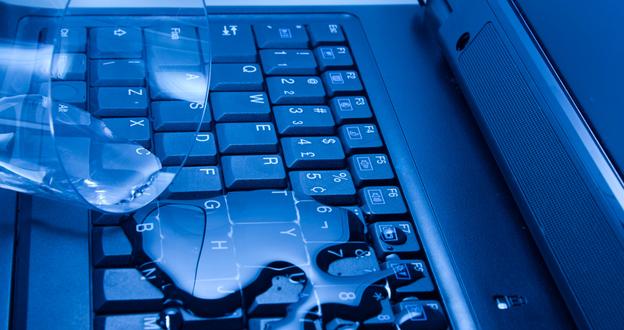
If your laptop just got wet, do three things in the next 60 seconds: hold the power button until the screen goes dark, unplug every cable and peripheral, and turn the laptop upside down so liquid drains away from the motherboard. Speed matters more than any other variable — in our experience repairing liquid-damaged laptops for Albany-area businesses, devices powered off within 30 seconds survive at a dramatically higher rate than those left running while the owner hunts for paper towels.
What Actually Happens Inside a Wet Laptop
Liquid damage is rarely a single catastrophic event. The immediate danger is a short circuit — conductive liquid bridges two points on the motherboard that should never touch, sending current where it does not belong. But the slower, often more destructive process is corrosion. According to data published by the Insurance Information Institute, water damage is among the top three causes of electronics loss claims for small businesses. More practically: in our work with Albany-area clients over the past decade, roughly 60 percent of liquid-damaged laptops that reach us within an hour of the spill are fully recoverable. That number drops to below 30 percent when a device is brought in two or more days later — often because the owner assumed air-drying was enough and kept trying to power it on.
The liquid itself matters as much as the volume spilled. Plain water is the most forgiving. Coffee, tea, juice, soda, and anything with sugar or salt are far more damaging because those dissolved solids remain on circuit board traces after the water evaporates, continuing to corrode copper and solder joints for days or weeks. A laptop that “seemed fine” after drying can fail weeks later from delayed corrosion — we see this pattern every month in our laptop repair queue.
Immediate Triage: The First Five Minutes
Follow these steps in order. Do not skip ahead.
- Power off immediately. Do not use the standard shutdown menu — hold the power button for five seconds for a hard shut-off. Every second the laptop remains on while wet increases the chance of a permanent short circuit.
- Unplug the AC adapter and all peripherals. USB devices, external monitors, docking stations — disconnect everything. External power sources can continue driving current through a wet board even after the laptop itself is off.
- Turn the laptop upside down. Open the lid to roughly 90 degrees and place the keyboard face-down on a clean, dry surface. Gravity is your first drying tool. This position allows pooled liquid to drain away from the motherboard rather than toward it.
- Remove the main battery if it is externally accessible. Many modern laptops — especially ultrabooks — have internal batteries that require full disassembly to reach. If your model has a removable panel on the bottom, remove it and disconnect the battery. Do not attempt to pry open a sealed chassis while wet. The main laptop battery is a large rectangular lithium-ion or lithium-polymer pack, typically spanning a significant portion of the laptop’s base — not a small coin-cell CMOS battery. Disconnecting it removes the largest source of continuous current flow through any residual liquid.
- Blot visible liquid with a lint-free cloth or microfiber towel. Avoid paper towels inside the chassis — paper towel fibers shed lint that can lodge in connector pins and on PCB traces, creating contamination problems that outlast the original spill. On the keyboard surface, gentle blotting is fine.
What Not to Do — and Why
Outdated advice still circulates online, and some of it causes real harm. Here is what our technicians see go wrong:
- Do not use a hair dryer. The risk is not static discharge — it is heat. A hair dryer on even the “cool” setting pushes forced air that can drive moisture deeper into connectors and under chips. On the warm or hot setting, it can warp the plastic chassis, delaminate keyboard membranes, and — in worst cases — cause a lithium battery to vent or swell. Set the laptop in a warm, well-ventilated room instead.
- Do not use rice. Rice does not absorb moisture meaningfully from inside a sealed chassis. What it does do is introduce starch dust and small fragments into ports and vents. It is a persistent myth with no engineering basis.
- Do not keep trying to power it on. Each attempt while moisture remains on the board risks a new short. If the first power-on attempt fails, stop and bring the device to a professional.
- Do not assume 24–48 hours of drying is sufficient for anything other than plain water. Coffee, soda, or juice spills require professional cleaning because the corrosive residue does not evaporate with the water. A laptop that air-dries after a coffee spill may power on initially and fail within weeks as corrosion progresses.
The Professional Repair Process: What We Actually Do
When a liquid-damaged laptop comes into our shop, the process looks nothing like what a 2009 how-to article describes. Our certified technicians perform a structured assessment before any cleaning begins.
Inspection and Component Triage
We disassemble the device completely and inspect the motherboard under magnification for corrosion, burn marks, and bridged solder points. We note which liquid was involved — this changes the cleaning protocol significantly. We also assess whether the SSD or hard drive shows signs of moisture intrusion, since data recovery planning begins at this stage, not after a failed repair attempt.
Isopropyl Alcohol Cleaning
For most liquid damage cases, we use 99% isopropyl alcohol applied with precision brushes to dissolve and lift mineral deposits and sugary residue from PCB traces and connectors. Isopropyl alcohol evaporates cleanly, leaves no conductive residue, and is safe for electronics. This step alone — which is absent from virtually every consumer guide — is often the difference between a board that works and one that corrodes to failure over the following months.
Ultrasonic Cleaning for Severe Cases
In cases of heavy contamination — saltwater, soda, significant coffee spills, or devices that were not brought in quickly — we use professional ultrasonic cleaning equipment. An ultrasonic cleaner uses high-frequency sound waves in a safe cleaning solution to reach contamination in areas that brushes cannot access: under BGA chips, inside multi-layer connector housings, and within capacitor arrays. This is the same process used by professional board-level repair facilities and is not achievable at home.
Component-Level Testing
After cleaning and drying, we test the board systematically: power rails, charging circuits, RAM slots, storage interfaces, and display output. We identify which components, if any, require replacement. Common failure points we see in Capital Region repairs include the DC power jack area, the keyboard controller, and the USB charging circuitry — all locations where liquid pools naturally due to the laptop’s geometry.
If the Laptop Won’t Boot: Data Recovery
A laptop that does not power on after a liquid damage event does not necessarily mean your data is gone. In most spill scenarios, the SSD or hard drive survives even when the motherboard does not — the storage drive sits in a protected area of the chassis and is rarely the primary point of failure. Our team offers data recovery services that can retrieve files from a non-booting device in the majority of cases where the storage media itself is intact.
If you keep business-critical data on a laptop, this is also the right moment to evaluate your backup posture. Our Cloud Backup and Disaster Recovery solutions ensure that a single hardware failure — whether from liquid damage, theft, or mechanical failure — does not become a data loss event. We work with businesses across Albany, Schenectady, Troy, Clifton Park, and the broader Capital Region to build backup strategies that mean a spilled coffee is an inconvenience, not a crisis.
Survival Rates and Cost Expectations
| Liquid Type | Response Time | Typical Recovery Rate* | Estimated Repair Range |
|---|---|---|---|
| Plain water | Under 1 hour | ~70–80% | $75–$200 |
| Coffee or tea (no sugar) | Under 1 hour | ~55–65% | $100–$275 |
| Coffee, soda, juice (with sugar/salt) | Under 1 hour | ~40–55% | $150–$350+ |
| Any liquid | 24+ hours later | ~20–35% | $200–$400+ or board replacement |
*Recovery rate estimates are based on outcomes from liquid damage repairs performed by Will Power PCs technicians and are consistent with ranges reported by independent repair industry sources. Individual results vary by laptop model, liquid volume, and specific components affected.
Serving Capital Region Businesses with Expert Laptop Repair
Will Power PCs has provided laptop repair in Albany and across the Capital Region since 2012. Our technicians have hands-on experience with hundreds of liquid damage cases for local businesses in Albany, Schenectady, Troy, Clifton Park, Saratoga Springs, Colonie, and East Greenbush. We offer a free diagnostic on every liquid damage case — you will know what happened and what it costs to fix before you commit to any repair.
For businesses that rely on their devices, our Managed IT Services plans include priority support and hardware response so that a single damaged laptop does not halt your operations. Our 30-minute response SLA means someone is working on your problem fast — not after a ticketing queue clears.
If your laptop has just been damaged by liquid, or if a device failed days after a spill and you are only now connecting the dots, do not wait. Corrosion is active and progressive. The sooner a professional cleans the board, the better the outcome.
Call us now at 518-764-7000 or schedule your free diagnostic online. We serve businesses and professionals throughout the Albany Capital Region with same-day and next-day appointments available for liquid damage cases.

Leave a Reply
You must be logged in to post a comment.